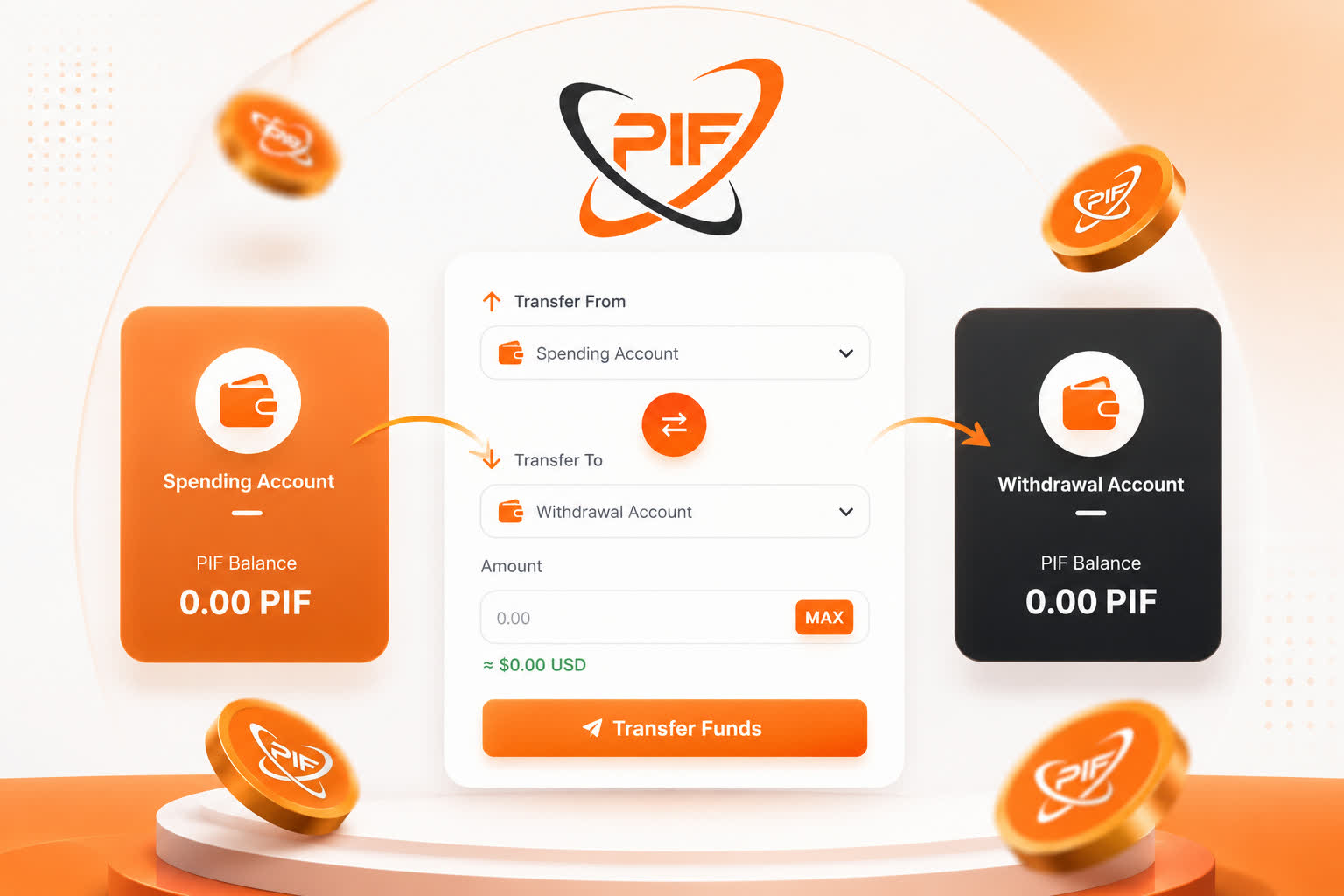
Managing your cryptocurrency should be simple, fast, and affordable. At TheBenefactor.net, we’ve built an Internal Wallet Transfer system that lets you move your PIF tokens between your Spending Account and Withdrawal Account instantly, without paying blockchain network fees.
Whether you’re preparing to withdraw your earnings or moving funds back to participate in platform activities, transferring your balance only takes a few seconds.
Why Use Internal Wallet Transfers?
Unlike traditional blockchain transfers that require gas fees and confirmation times, internal transfers happen entirely within your TheBenefactor.net account.
Benefits include:
- ⚡ Instant transfers
- 💸 Zero network fees
- 🔒 Secure PIN verification
- 📊 Real-time balance updates
- 💰 Live USD value calculation
- 🔄 Transfer funds back and forth anytime
Your funds never leave the platform during an internal transfer, making the process both faster and more efficient.
Understanding Your Wallet Balances
Before transferring funds, it’s important to understand the purpose of each account.
Spending Account
Your Spending Account is designed for activities within TheBenefactor.net.
Use it for:
- Participating in platform features
- Purchasing services or products
- Supporting campaigns
- Other platform-based transactions
Withdrawal Account
Your Withdrawal Account stores funds that are ready to be withdrawn to your external cryptocurrency wallet.
Think of it as your dedicated withdrawal balance that keeps your spending funds separate from your withdrawable earnings.
How to Transfer Funds Between Accounts
Moving your PIF tokens only takes a few simple steps.
Step 1: Open the Transfer Page
Log in to your TheBenefactor.net account and navigate to your Dashboard
Inside the Spending Account card, click Manage Account Balances to open the Internal Wallet Transfer page.
Step 2: Choose Where to Transfer From
Select:
- Transfer From: Spending Account or Withdrawal Account
- Transfer To: The other account
Need to reverse the direction?
Simply click the Swap button between the two account selectors.
Step 3: Enter Your Transfer Amount
Type the amount of PIF tokens you’d like to transfer.
Helpful features include:
- Your available balance is displayed automatically.
- Click MAX to transfer your entire available balance.
- Instantly see the approximate USD value of your transfer.
This makes it easy to know exactly how much you’re moving.
Step 4: Verify Using Your Security PIN
If you’ve enabled a 4-digit Security PIN, you’ll be asked to enter it before the transfer is processed.
This extra layer of protection helps keep your account secure and prevents unauthorized transfers.
Tip: If you haven’t enabled a Security PIN yet, we highly recommend setting one up to improve your account security.
Step 5: Complete the Transfer
Click Transfer Funds.
Your transfer is processed instantly.
You’ll immediately see:
- Updated account balances
- Transfer confirmation
- USD equivalent of the transferred amount
- Success notification
No waiting.
No blockchain confirmations.
No network fees.
Why There Are No Network Fees
Traditional cryptocurrency transfers require sending transactions through a blockchain network, which means paying gas fees.
Internal Wallet Transfers on TheBenefactor.net are different.
Since both balances belong to your account on the platform, no blockchain transaction is required. Everything happens internally, allowing transfers to complete instantly at zero cost.
That means you can move funds as often as you like without worrying about transaction fees eating into your balance.
Frequently Asked Questions
Are internal transfers really free?
Yes.
Internal Wallet Transfers are completely free because they don’t interact with external blockchain networks.
Which tokens are supported?
Currently, internal wallet transfers are available for PIF tokens on the BNB Smart Chain (BNB Chain) only. Additional network support will be introduced as TheBenefactor.Net continues to grow.
Is there a minimum transfer amount?
Yes.
The minimum transfer amount is only:
0.00000001 PIF
This allows precise transfers, even for very small balances.
Can I move funds back later?
Absolutely.
Transfers work in both directions.
If you move funds into your Withdrawal Account and later decide to use them on the platform, simply transfer them back to your Spending Account.
Since transfers are instant and free, there’s no penalty for changing your mind.
Will I receive confirmation?
Yes.
Every successful transfer generates an on-platform notification containing:
- Amount transferred
- USD equivalent
- Source account
- Destination account
- Updated balances
Best Practices for Managing Your Wallet
To make the most of your account:
- Enable a Security PIN for additional protection.
- Keep spending funds separate from withdrawable earnings.
- Review your balances before confirming each transfer.
- Use the MAX button when transferring your full balance.
- Double-check the source and destination accounts before submitting
Start Managing Your Funds More Efficiently
The Internal Wallet Transfer feature gives you complete control over your PIF tokens without the delays and costs of traditional blockchain transfers.
Whether you’re preparing to withdraw your earnings or moving funds back for platform activities, transfers are:
- Instant
- Secure
- Completely free
- Available anytime
Managing your crypto should be easy, and with TheBenefactor.net, it is.
If you have any questions or need assistance, our support team is always ready to help through the Contact Support page.