In today’s digital world, account security is more important than ever. Every day, cybercriminals attempt to gain access to user accounts through phishing attacks, password leaks, and social engineering scams.
That’s why TheBenefactor.net encourages users to adopt strong security practices through our Security Rewards Program.
Not only do these security measures help protect your account, but they may also make you eligible to earn rewards for taking responsible actions. 🎉
In this guide, we’ll explain how security rewards work, why they matter, and how you can participate safely.
What Are Security Rewards? 🛡️
Security Rewards are incentives offered to users who complete approved account protection actions.
The goal is simple:
✅ Encourage safer online habits
✅ Reduce account compromise risks
✅ Build a stronger and safer community
✅ Reward users for taking security seriously
Instead of waiting until something goes wrong, security rewards motivate users to take preventive steps that strengthen their accounts before problems occur.
Where to Find Security Rewards 🎯
Getting started with Security Rewards is easy.
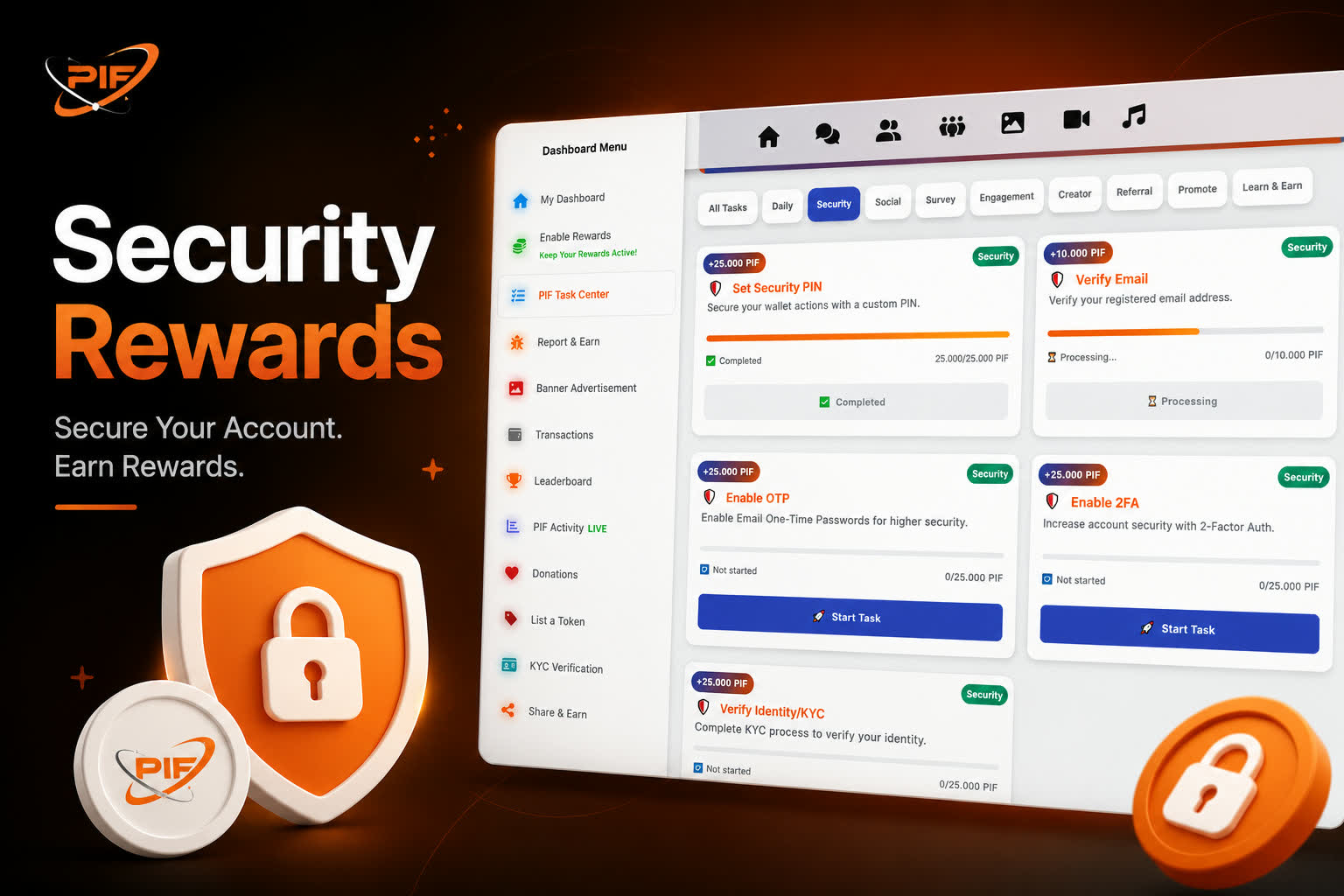
You can find all available security-related tasks by following these steps:
Step 1: Open Your Dashboard
After logging in to your account, head to your Dashboard where you’ll find access to your account activities, rewards, and tasks.
Step 2: Visit the Task Center
Inside the Dashboard, click on Task Center. This is where you can discover various opportunities to earn rewards on TheBenefactor.net
Step 3: Open the Security Tab
Within the Task Center, select the Security tab. Here you’ll find all available security tasks that may qualify for rewards.
Examples may include:
🔒 Enabling Two-Factor Authentication (2FA)
📧 Verifying Your Email Address
📱 Enabling Phone Verification
🛡️ Adding Additional Account Protection Features
✅ Completing Other Security-Related Actions
Each task will display its requirements and reward information, making it easy to see what actions are available and what benefits you can earn.
Why Check Regularly?
New security tasks and reward opportunities may be added over time. Checking the Security tab regularly ensures you never miss a chance to strengthen your account and earn additional rewards.
Path: Dashboard → Task Center → Security 🚀
Why Account Security Matters
Many users underestimate how valuable their accounts can become over time.
An account may contain:
- Personal information
- Messages and communications
- Rewards and earned tokens
- Community reputation
- Saved settings and preferences
A compromised account can result in lost access, stolen rewards, and unnecessary stress.
By completing security-focused actions, you’re investing in the long-term protection of your digital identity.
How Security Rewards Work ⚙️
The process is straightforward and designed to be fair for everyone.
Step 1: Complete an Eligible Security Action
Start by performing a supported security task.
Examples may include:
- Verifying your email address
- Enabling Two-Factor Authentication (2FA)
- Adding a security PIN
- Verifying trusted account information
- Completing other approved security features
Available actions may change over time as new security features are introduced.
Step 2: Submit or Activate the Security Feature
Some security rewards are granted automatically after the action is completed.
Others may require a review process to verify that the action was performed correctly and meets current program requirements.
Step 3: Verification and Review
To maintain fairness and prevent abuse, the platform may review completed actions before approving rewards.
During this stage, the system checks:
- Eligibility requirements
- Security action validity
- Abuse-prevention filters
- Program compliance
This helps ensure rewards are distributed fairly and only for legitimate actions.
Step 4: Reward Approval 🎁
Once the security action is verified, the reward is approved and credited according to the current program rules.
You may receive:
- PIF token rewards
- Account notifications
- Confirmation messages
- Other benefits associated with the active campaign
Step 5: Enjoy a More Secure Account 🔐
The best reward isn’t just the tokens.
You’ll also benefit from:
- Better account protection
- Lower risk of unauthorized access
- Stronger identity verification
- Greater confidence while using the platform
Important Things to Remember
Before participating, keep these points in mind:
✔ Rewards Can Change
Reward amounts and available campaigns may change over time based on platform updates and program settings.
✔ Some Actions Require Review
Not every reward is instant. Certain actions may require manual or automated verification before approval.
✔ Follow Official Procedures
Security actions should always be completed through official platform settings and approved workflows.
✔ Never Share Sensitive Information
This is extremely important.
You should never share:
❌ Passwords
❌ Private keys
❌ Recovery phrases
❌ Authentication codes
❌ Wallet seed phrases
No legitimate security reward should ever require these details.
Benefits of the Security Rewards Program 🚀
The Security Rewards Program creates value for both users and the platform.
For Users
- Earn rewards for responsible behavior
- Improve account protection
- Learn better security habits
- Reduce the chance of account compromise
For The Community
- Stronger overall platform security
- Fewer compromised accounts
- Reduced abuse and fraud
- A safer environment for everyone
When more users secure their accounts, the entire ecosystem becomes healthier and more trustworthy.
Security Tips Every User Should Follow
Even beyond rewards, consider these best practices:
🔒 Use a unique password
🔒 Enable Two-Factor Authentication (2FA)
🔒 Verify your email address
🔒 Never click suspicious links
🔒 Keep your devices updated
🔒 Review account activity regularly
🔒 Never share private credentials
Small security improvements today can prevent major problems tomorrow.
Frequently Asked Questions (FAQ)
What are Security Rewards?
Security Rewards are incentives given to users who complete approved account protection actions designed to improve account safety.
Do I need to share sensitive information to qualify?
No. You should never share passwords, recovery phrases, private keys, or other confidential information.
Why hasn’t my reward been approved yet?
Your security action may still be under review, or it may not currently meet the eligibility requirements for the active campaign.
Can reward amounts change?
Yes. Reward values may be adjusted based on program updates, campaign rules, and administrative decisions.
Are Security Rewards available to all users?
Eligibility depends on the specific security action and current program requirements.
Final Thoughts
Security is not just about protecting yourself , it’s about helping create a safer community for everyone. 🌍
The Security Rewards Program encourages users to take simple but meaningful steps toward better account protection while recognizing those efforts through rewards.
Whether you’re enabling additional security features or verifying your account information, every step you take contributes to a stronger and more secure platform.
Stay safe, protect your account, and make security a habit. 🔐✨